Guide

When nothing should get left hanging

Nothing gets lost, nothing gets left hanging.
Until it's done.

When a commitment already exists as a screenshot, share, or message — and the risk is silence, a missed window, or "I'll remember later" — ActionShot Tracker turns that source into a confirmed next step, tracks whose turn it is, and reminds you until you close it.

ActionShot Tracker is a single-user follow-through app for personal and professional commitments. Tracking starts only after you confirm. Not affiliated with other products named "ActionShot".

Coming soon to the App StoreJoin the testActionShot Tracker is in pre-launch testing and not yet available in app stores.
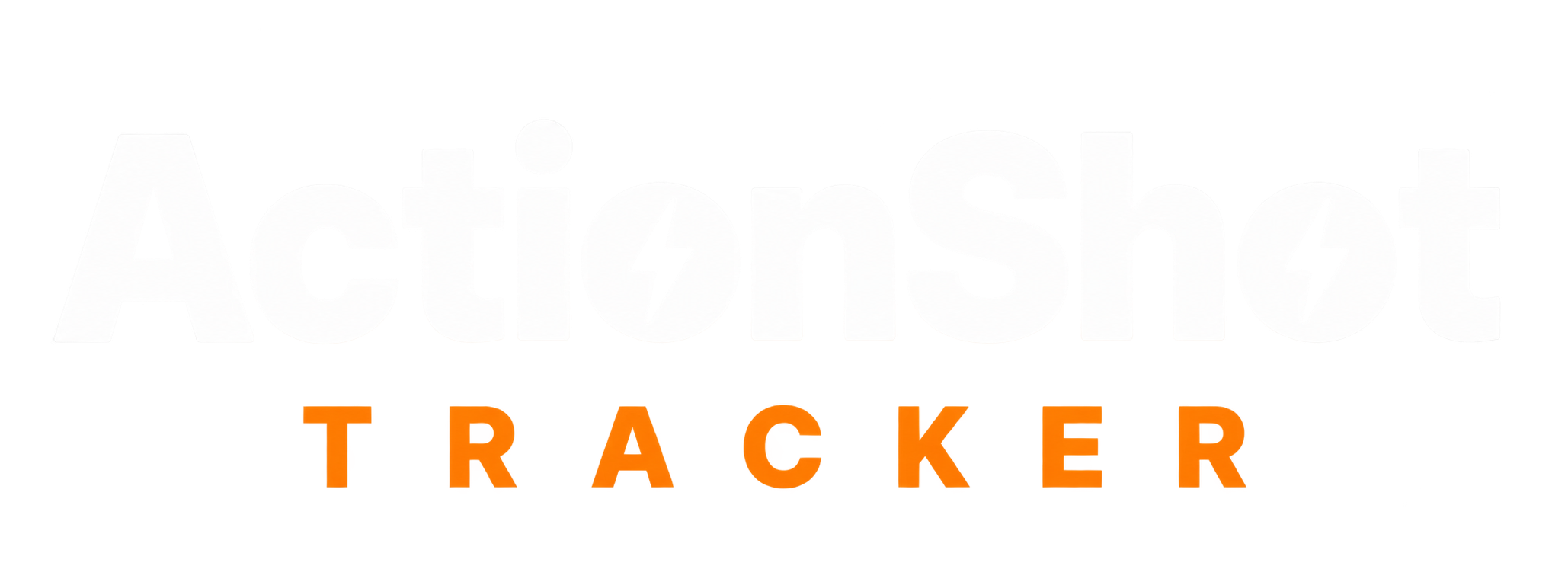
ActionShot Tracker home sorted by Your turn, Waiting on them, and Gone quiet

Specific use situations

Boundaries — what we are / aren't

Case-style answers

Waiting on a supplier quote

Scenario: You asked for a quote three days ago; the thread went quiet.
What ActionShot Tracker does: Share or screenshot the ask; confirm "waiting on them," person, and follow-up date; check-ins + gone-quiet nudge.
Outcome: Whose turn stays visible — nothing gets left hanging — until you close it.

Free trial email in Screenshots

Scenario: A 7-day trial confirmation sits in Photos; charge day is Friday.
What ActionShot Tracker does: Suggests cancel-before date + next step; you confirm; reminder before charge.
Outcome: You cancel or keep intentionally — nothing gets lost into the camera roll.

Return window half gone

Scenario: Return label and tracking live in chat.
What ActionShot Tracker does: Suggests next step + deadline; you confirm; reminds until refund received.
Outcome: The window doesn't expire unnoticed — until it's done.

Bill due date not on any calendar

Scenario: Utility PDF screenshot isn't a calendar event.
What ActionShot Tracker does: Suggests due date and pay next step; you confirm; remind a few days early.
Outcome: Payment on time without rebuilding a todo from scratch.

Wedding vendor still "will confirm"

Scenario: Florist said they'd confirm Saturday; you only have a text screenshot.
What ActionShot Tracker does: Confirm waiting-on-them + follow-up date in Personal space; gone-quiet nudge if silence.
Outcome: Vendor threads stay visible with other personal-stretch items.

How it works in 5 steps

01

Choose what to share

Screenshot, system share, photo, voice, or text — you pick what to add.

02

On-device text recognition suggests

Title, next step, date, and whose turn — original source kept attached.

03

You review and confirm

Edit or remove anything. Tracking starts only after you confirm.

04

Get reminded until it's done

Your-turn reminders; waiting-on-them check-ins; gone-quiet nudge.

05

Close consciously

Complete, cancel, or no longer needed — only you decide when it's done.

FAQ

What is ActionShot Tracker?

ActionShot Tracker is a single-user follow-through app for personal and professional commitments. It turns screenshots and other sources you choose to provide into a confirmed next step and reminds you until it's done.

When should I use it instead of a to-do app?

When the commitment already exists as a source and you need next step and whose turn — not a blank checkbox you have to rewrite.

When should I use it instead of a screenshot reminder?

When resurfacing the image isn't enough — you need a confirmed next step, waiting-on-them check-ins, and reminders until it's done.

Does it read my whole photo library or messages?

No. It only processes content you choose to provide. Tracking starts only after you confirm.

Is it available on the App Store?

Not yet. ActionShot Tracker is in pre-launch testing and is not yet available in app stores. You can join the test.

Nothing gets lost, nothing gets left hanging.

Coming soon to the App StoreJoin the testActionShot Tracker is in pre-launch testing and not yet available in app stores.